
CMRR
Center for Magnetic Resonance Research, Department of Radiology
PhysioFix rollPlot
You are here
   Usage: rollPlot file1 [ ... fileN]
      where file can be sdtRoot or asciiFile.ext
If no file extension is given, the data is assumed to
be an sdt/spr file pair, otherwise it is assumed to
be an ascii file.
The .sdt files must be 1D Real (i.e. float)
and the .asc must be ascii with one value
per line.
See Sdt File Format for details.
For example, to load the .sdt file pair {cardiac.sdt, cardiac.spr} and the .asc file ch1.asc:
Example> rollPlot cardiac ch1.asc
GUI (Graphical User Interface)
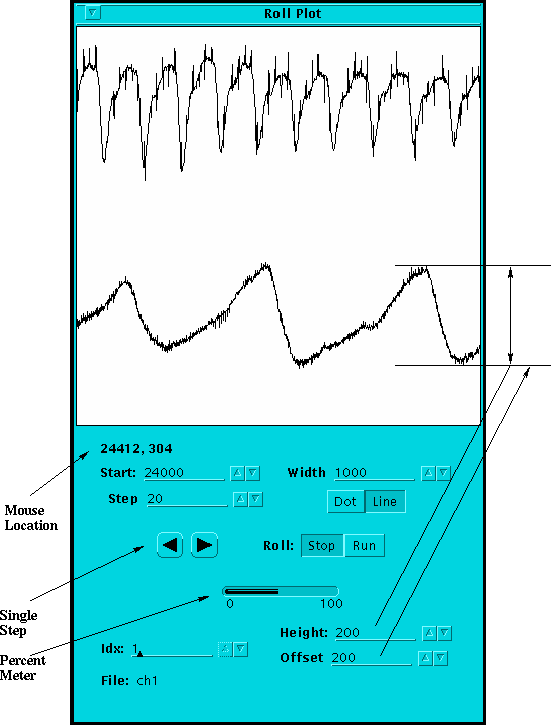
- Mouse Location
- (Horizontal, Vertical) position of the mouse, where Horz is in data point units and Vert is in canvas pixel units. The canvas is 400x400 pixels.
- Start
- First data point plotted.
- Step
- Amount to scroll the plot with Single Step or Roll.
- Single Step
- Scroll the plot forward or backwards by Step amount.
- Width
- Number of data points to plot.
- [Dot][Line]
- Plot each data point as a dot or connect adjacent data points with a line.
- Roll
- Dynamically scroll the plot by Step amount.
- Percent Meter
- Indicates the Start location relative to the total number of data points.
- Idx
- Select which plot to modify with Height or Offset.
- File
- Filename relative to the Idx.
- Height
- The number of canvas pixels to scale the plot.
- Offset
- The vertical location in canvas pixels from the bottom to plot the minimum data point value.